Start using Scroll-driven animations today!
To celebrate scroll-driven animations finally landing in Safari 26, here are some things you probably want to know before using them.
The anatomy of a scroll driven animation
.card {
  @media (prefers-reduced-motion: no-preference) {
    animation-timeline: view();
    /* or scroll(), optionally add the axis in which you're scrolling or leave empty for y */
    animation-name: rotate-card; /* your keyframe animation */
    animation-range: cover;
    /* how long do you want your animation to run for? See sources for a visualizer */
    animation-fill-mode: both;
    /* recommended to make sure animation doesn't return to initial state after being completed */
  }
}

@keyframes rotate-card {
  to {
    rotate: 10deg;
  }
}We don’t need the animation-duration property as the animation duration is determined by the animation-range now. This code would rotate the element with the class .card 10 degrees over the range cover, which means: as long as the element is visible in the viewport it will animate.
Animation ranges
So, animation ranges determine the length of the animation, the documentation on this is a difficult read, Bramus van Damme created this visualizer which helps a lot, but I also created a sketch with all the different ranges side by side.
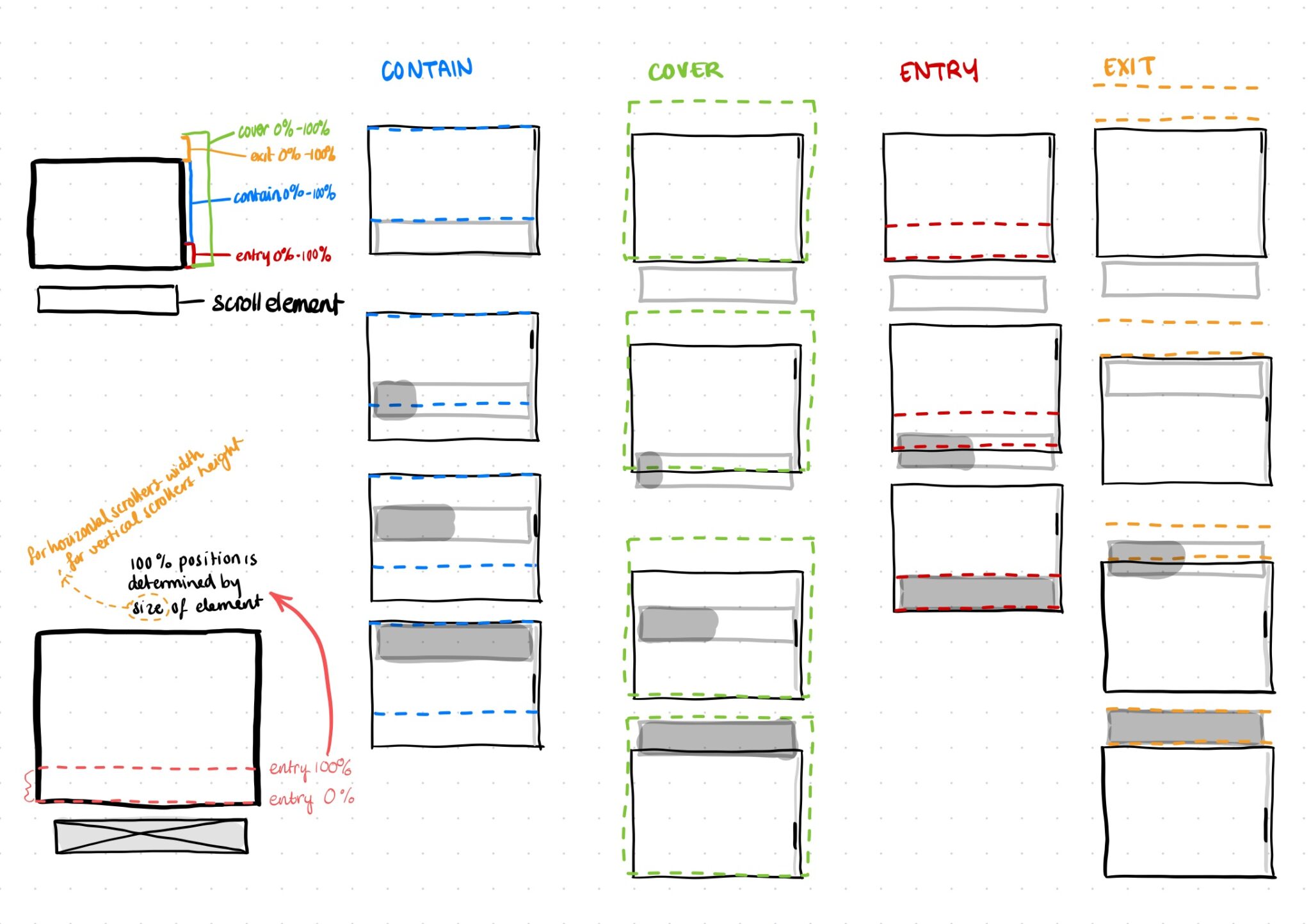
You can combine the ranges, using for example animation-range: cover contain;, this means the animation will start at the cover start point and end at the contain end point.
But wait, we can make it more confusing! We can also add percentages! 🖖 Like: animation-range: cover 10% contain 90%;.
Let’s break this down; when you use animation-range: cover, that’s actually shorthand for animation-range: cover 0% cover 100%;. So cover 10% means that we’re starting at 10% of the cover start point, and contain 90% means we’re stopping at 90% of the contain range.
Still with me? Here’s where it get’s even worse… You can also use other CSS units in ranges! So what does animation-range: cover 10vh; do? Well it starts the range at the cover start range + 10vh of course! 😎
All kidding aside, it’s a new mental model for me, and I’m very disappointed salty that browser’s decided not to try and implement existing patterns from libs like GSAP for example, but once you get used to them a bit, they’re usable too 😅.
View timelines vs. scroll timelines
View timelines (animation-timeline: view();) are determined by the element’s position within the viewport, scroll timelines (animation-timeline: scroll();) are determined by the scrollable container. I’m only focussing on view timelines in this article as I have barely used scroll timelines.
View timeline name
You can set a different element to be used for the view-timeline-range, reference the element you want to use as a view timeline with view-timeline-name and in stead of using animation-timeline: view() you use the name you gave your view timeline.
.cards {
  view-timeline-name: --cards;
}
.card {
  @media (prefers-reduced-motion: no-preference) {
    animation-timeline: --cards;
    /* or scroll(), optionally add the axis in which you're scrolling or leave empty for y */
    animation-name: rotate-card; /* your keyframe animation */
    animation-range: cover;
    /* how long do you want your animation to run for? See sources for a visualizer */
    animation-fill-mode: both;
    /* recommended to make sure animation doesn't return to initial state after being completed */
  }
}
@keyframes rotate-card {
  to {
    rotate: 10deg;
  }
}Now in stead of the cards’ visibility determining the range it will be it’s outer container: .cards. The element you reference using view-timeline-name needs to either be a direct parent of the element you’re animating or you need to add the name in timeline-scope on a shared parent. Read more about using timeline-scope here.
A simple example
See the Pen Simple scroll driven animations by Cyd Stumpel (@Sidstumple) on CodePen.
In this simple example I’ve added the code from the very start of this article, the range is set to cover so as long as the card is visible within the viewport the element is animating.
If I use the .cards section as a view-timeline reference the cards will animate on the same range; as long as the section is in view.
See the Pen Simple scroll driven animations view-timeline-name by Cyd Stumpel (@Sidstumple) on CodePen.
Accessibility
When you’re adding animation to your website you always need to keep in mind that some people get sick from motion, and respect a user’s preferences. You can encase your code in a prefers-reduced-motion media query that’s set to no-preference.
@media (prefers-reduced-motion: no-preference) {
  /* Your animations */
}Fallbacks
A lot of people don’t immediately update their browsers or operating systems, and scroll driven animations aren’t supported in Firefox yet, so it’s smart to create fallbacks, I wrote an earlier article about two strategies to do just that!
More examples
I have created a few more examples using Scroll-driven Animations on codepen, saved in this collection.
Sources

Last updated: January 3, 2026
Replies 4

See @cydstumpel.nl‘s other post on progressively enhancing with scroll-driven animations, too!

The title is stuck in the middle of the page on Firefox mobile (Android)

Damn, that’s rough haha, pushing a fix now, thanks for letting me know

Thank you for the great write-up
Mentioned on other websites: 3
Likes 59


Reposts 19




Webmentions are a way to connect with other people who have shared your work.


